Basics
Learn the fundamentals of Railway-Oriented Programming (ROP) and type-safe domain modeling in just a few minutes.
Table of Contents
- What is Railway-Oriented Programming?
- Why Avoid Primitive Obsession?
- Result Type
- Core Extension Methods
- Putting It All Together
- Working with Async Operations
- Common Beginner Questions
- Quick Reference
- Next Steps
What is Railway-Oriented Programming?
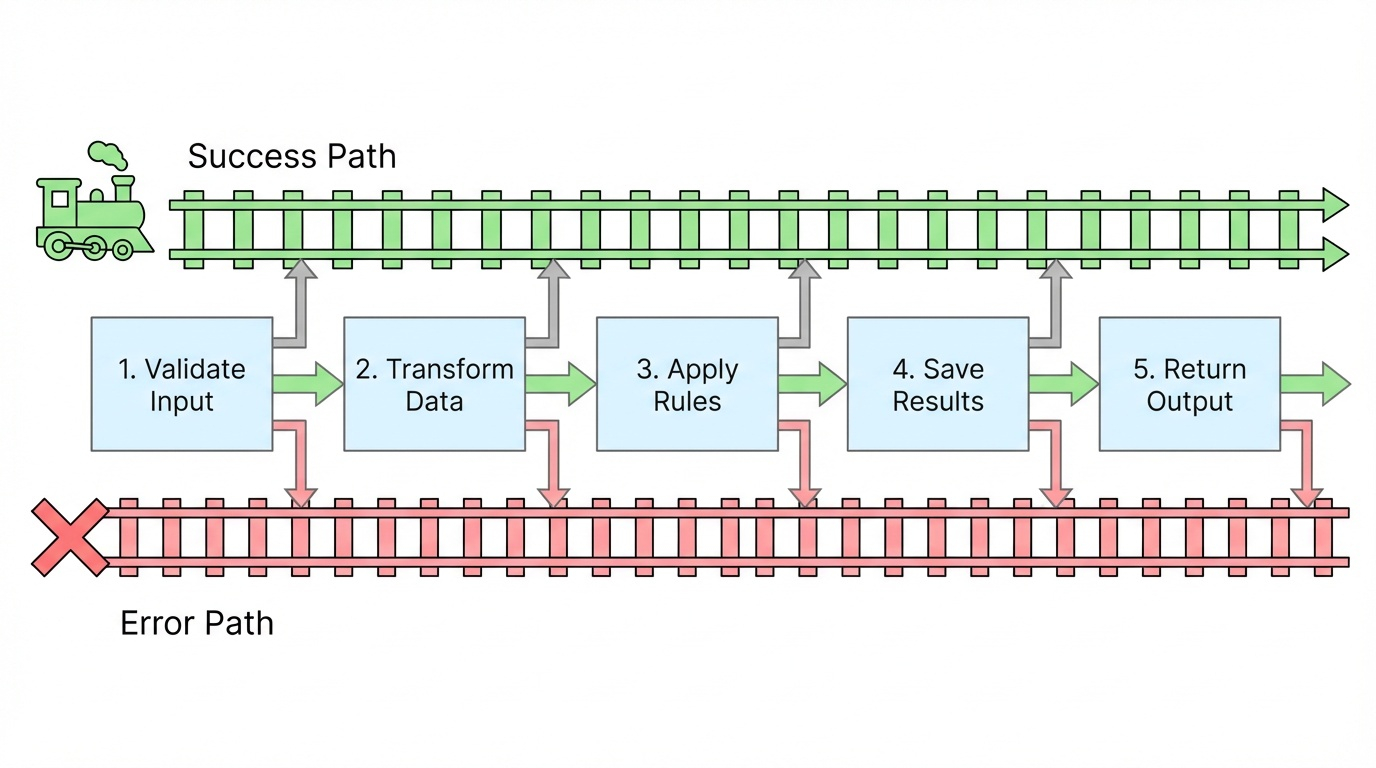
Railway-Oriented Programming is a functional programming pattern that treats your code like a railway track with two paths:
- 🟢 Success Track - Operations continue when everything works
- 🔴 Failure Track - Errors are captured and propagated automatically
Instead of checking for errors after every operation, ROP lets you chain operations together. If any step fails, the rest are automatically skipped—like a train switching to an error track.
graph LR
    A[Start] --> B{Operation 1}
    B -->|Success| C{Operation 2}
    B -->|Failure| E[Error Track]
    C -->|Success| D{Operation 3}
    C -->|Failure| E
    D -->|Success| F[Success Result]
    D -->|Failure| E
    E --> G[Failure Result]

    style F fill:#90EE90
    style G fill:#FFB6C6
    style E fill:#FFD700
Benefits:
- ✅ Explicit error handling (no hidden exceptions)
- ✅ Clean, readable code without nested if-statements
- ✅ Type-safe operations that prevent runtime errors
- ✅ Compiler-enforced error handling
Visual Comparison: Traditional vs Railway-Oriented
Traditional Approach:
// ❌ Nested error checking - hard to read
var firstName = ValidateFirstName(input.FirstName);
if (firstName == null) return BadRequest("Invalid first name");

var lastName = ValidateLastName(input.LastName);
if (lastName == null) return BadRequest("Invalid last name");

var email = ValidateEmail(input.Email);
if (email == null) return BadRequest("Invalid email");

var user = CreateUser(firstName, lastName, email);
if (user == null) return BadRequest("Cannot create user");

return Ok(user);
Railway-Oriented Approach:
// ✅ Clean railway - automatic error handling
return FirstName.TryCreate(input.FirstName)
    .Combine(LastName.TryCreate(input.LastName))
    .Combine(EmailAddress.TryCreate(input.Email))
    .Bind((first, last, email) => User.TryCreate(first, last, email))
    .Match(
        onSuccess: user => Ok(user),
        onFailure: error => BadRequest(error.Detail)
    );
Why Avoid Primitive Obsession?
Passing strings as parameters can cause errors. Consider this example where first and last names could be swapped:
Person CreatePerson(string firstName, string lastName)
{
    return new Person(firstName, lastName);
}

var firstName = "John";
var lastName = "Smith";
var person = CreatePerson(lastName, firstName);  // ❌ Oops! Swapped parameters
This compiles successfully but creates a person with first name "Smith" and last name "John"—a runtime logic bug the compiler can't catch.
Creating Type-Safe Parameters
Create dedicated classes for each domain type (FirstName, LastName). In Domain-Driven Design, objects must maintain valid state, requiring parameter validation before instantiation.
For simple null/empty checks, use the RequiredString base class provided by the library:
// These classes inherit from RequiredString which ensures non-empty values
public partial class FirstName : RequiredString
{
}

public partial class LastName : RequiredString
{
}

Person CreatePerson(FirstName firstName, LastName lastName)
{
    return new Person(firstName, lastName);
}
Why partial? The class must be partial to allow source code generation of the TryCreate method by the library.
The generated TryCreate method returns a Result type that is either Success or Failure:
Result<FirstName> firstNameResult = FirstName.TryCreate("John");
// Returns Success with value "John"

Result<FirstName> emptyResult = FirstName.TryCreate("");
// Returns Failure with error "First Name cannot be empty"
The Old Way: Manual Error Checking (Verbose) ❌
Result<FirstName> firstNameResult = FirstName.TryCreate("John");
if (firstNameResult.IsFailure)
{
    Console.WriteLine(firstNameResult.Error.Detail);
    return;
}

Result<LastName> lastNameResult = LastName.TryCreate("Smith");
if (lastNameResult.IsFailure)
{
    Console.WriteLine(lastNameResult.Error.Detail);
    return;
}

var person = CreatePerson(firstNameResult.Value, lastNameResult.Value);
Problems with this approach:
- Lots of repetitive if-statements
- Easy to forget error checks
- Verbose and hard to read
The compiler will catch parameter order mistakes because FirstName and LastName are different types!
Result<TValue> Type
Result<T> is a generic type that holds either a value or an error—never both. It's the foundation of Railway-Oriented Programming.
Result Structure
// Simplified structure (actual implementation in the library)
public readonly struct Result<TValue>
{
    public bool IsSuccess { get; }
    public bool IsFailure { get; }
    public TValue Value { get; }      // ⚠️ Throws if IsFailure
    public Error Error { get; }       // ⚠️ Throws if IsSuccess

    // Safe access methods (recommended)
    public bool TryGetValue(out TValue value);
    public bool TryGetError(out Error error);
}
⚠️ Important: Accessing Value on failure or Error on success throws an InvalidOperationException.
Safe Ways to Access Result Values
Option 1: Check state first
var result = FirstName.TryCreate("John");

if (result.IsSuccess)
{
    var name = result.Value;  // ✅ Safe
    Console.WriteLine($"Name: {name}");
}
else
{
    var error = result.Error;  // ✅ Safe
    Console.WriteLine($"Error: {error.Detail}");
}
Option 2: Use TryGetValue (recommended)
var result = FirstName.TryCreate("John");

if (result.TryGetValue(out var name))
{
    Console.WriteLine($"Name: {name}");
}
else if (result.TryGetError(out var error))
{
    Console.WriteLine($"Error: {error.Detail}");
}
Option 3: Use Match (most functional)
var result = FirstName.TryCreate("John");

var message = result.Match(
    onSuccess: name => $"Hello, {name}!",
    onFailure: error => $"Error: {error.Detail}"
);
Console.WriteLine(message);
Core Extension Methods (Building Blocks)
Extension methods eliminate tedious failure handling after each call, enabling Railway-Oriented Programming.
Railway Operations Flow
flowchart TB
    START[Input Data] --> COMBINE[Combine<br/>Validate All Inputs]
    COMBINE -->|All Valid| BIND[Bind<br/>Chain Operation]
    COMBINE -->|Any Invalid| ERROR[Error Result]

    BIND -->|Success| MAP[Map<br/>Transform Value]
    BIND -->|Failure| ERROR

    MAP --> ENSURE[Ensure<br/>Business Rules]

    ENSURE -->|Valid| TAP[Tap<br/>Side Effects]
    ENSURE -->|Invalid| ERROR

    TAP --> MATCH[Match<br/>Extract Result]

    MATCH --> SUCCESS[Success Output]
    MATCH --> FAILURE[Failure Output]

    ERROR --> COMPENSATE{Compensate<br/>Retry/Fallback?}
    COMPENSATE -->|Recover| TAP
    COMPENSATE -->|No Recovery| FAILURE

    style SUCCESS fill:#90EE90
    style FAILURE fill:#FFB6C6
    style ERROR fill:#FFD700
    style COMBINE fill:#E1F5FF
    style BIND fill:#FFE1F5
    style MAP fill:#FFF4E1
    style ENSURE fill:#E1FFE1
    style TAP fill:#FFE4B5
    style MATCH fill:#F0E68C
Combine - Validate Multiple Inputs
Use when: You need to validate multiple inputs and collect all errors together.
var result = FirstName.TryCreate("John")
    .Combine(LastName.TryCreate("Smith"));

// ✅ Success: result contains tuple (FirstName("John"), LastName("Smith"))
// ❌ Failure: result contains all validation errors from both
What you get:
- Success: A tuple
(FirstName, LastName)with both values - Failure: All validation errors collected together
Real-world example:
var result = EmailAddress.TryCreate("user@example.com")
    .Combine(FirstName.TryCreate("John"))
    .Combine(LastName.TryCreate("Smith"))
    .Combine(Password.TryCreate("SecurePass123!"));

// If email AND password are invalid, you get BOTH errors
// Perfect for form validation where you want to show all problems at once
Bind - Chain Operations
Use when: You want to call another operation that returns a Result.
var result = FirstName.TryCreate("John")
    .Combine(LastName.TryCreate("Smith"))
    .Bind((firstName, lastName) => CreatePerson(firstName, lastName));

// Calls CreatePerson only if both names are valid
// Returns the Person on success, or any validation/creation error
Key point: Bind is for chaining operations that return Result<T>.
Real-world example:
var result = UserId.TryCreate("12345")
    .Bind(userId => GetUserFromDatabase(userId))
    .Bind(user => UpdateUserEmail(user, newEmail))
    .Bind(user => SaveUserToDatabase(user));

// Each step only runs if the previous succeeded
// If GetUserFromDatabase fails (user not found), the rest are skipped
Map - Transform Values
Use when: You want to transform a successful value without returning a Result.
var result = EmailAddress.TryCreate("user@example.com")
    .Map(email => email.ToString().ToUpper());
// Result<string> containing "USER@EXAMPLE.COM" or an error
Key difference:
- Map: Transforms the value (function returns
T) - Bind: Chains operations (function returns
Result<T>)
When to use Map:
// ✅ Use Map for simple transformations
.Map(email => email.Domain)
.Map(price => price * 1.10m)  // Add 10% tax
.Map(user => new UserDto(user))

// ❌ Don't use Map if your function returns Result<T>
// Use Bind instead!
Tap - Execute Side Effects
Use when: You want to do something with the value (like logging) without changing it.
var result = FirstName.TryCreate("John")
    .Tap(name => Console.WriteLine($"Created name: {name}"))
    .Tap(name => _logger.LogInformation("Name validated: {Name}", name));
// Result<FirstName> - unchanged, but side effects executed on success
Common uses:
- 📝 Logging
- 📊 Auditing
- 🔔 Sending notifications
- 💾 Caching
- 🖥️ Updating UI
Important: Tap only runs on success. Use TapError for failures:
var result = FirstName.TryCreate("")
    .Tap(name => Console.WriteLine("Success!"))          // Skipped (failure path)
    .TapError(error => Console.WriteLine($"Error: {error.Detail}"));  // Runs!
// Output: "Error: First Name cannot be empty"
Ensure - Add Validation
Use when: You need additional validation beyond what TryCreate does.
var result = EmailAddress.TryCreate("user@spam.com")
    .Ensure(email => !email.Domain.Contains("spam"),
           Error.Validation("Spam domains not allowed"));
// Fails if email is from spam domain
Chaining multiple validations:
var result = Age.TryCreate(25)
    .Ensure(age => age >= 18, Error.Validation("Must be 18 or older"))
    .Ensure(age => age <= 120, Error.Validation("Invalid age"));
// Each validation only runs if the previous succeeded
When to use Ensure vs validation in TryCreate:
- TryCreate validation: Format and structure rules (email format, non-empty)
- Ensure validation: Business rules and context-specific rules (age limits, domain restrictions)
Compensate - Recover from Errors
Use when: You want to try a fallback when an error occurs.
var result = GetUserFromCache(id)
    .Compensate(error => GetUserFromDatabase(id));
// Try cache first, fallback to database on ANY error
With predicate for selective compensation:
var result = CallExternalApi()
    .Compensate(
        predicate: error => error is ServiceUnavailableError,
        func: () => GetCachedData()
    );
// Only use cache if service is unavailable (not on other errors)
Real-world example:
var result = GetUserFromCache(userId)
    .Compensate(error => GetUserFromDatabase(userId))
    .Compensate(error => GetDefaultUser());
// Try cache → database → default user
// Stops at first success
Match - Unwrap the Result
Use when: You're at the end of your chain and need to extract the final value.
string message = FirstName.TryCreate("John")
    .Combine(LastName.TryCreate("Smith"))
    .Bind((firstName, lastName) => CreatePerson(firstName, lastName))
    .Match(
        onSuccess: person => $"Created: {person.FullName}",
        onFailure: error => $"Error: {error.Detail}"
    );
// message is a plain string, not wrapped in Result
Match accepts two functions:
onSuccess: Called whenIsSuccess == trueonFailure: Called whenIsFailure == true
Putting It All Together
Example: User Registration (The ROP Way) ✅
public Result<User> RegisterUser(string firstName, string lastName, string email, string password)
{
    return FirstName.TryCreate(firstName)
        .Combine(LastName.TryCreate(lastName))
        .Combine(EmailAddress.TryCreate(email))
        .Combine(Password.TryCreate(password))
        .Tap(tuple => _logger.LogInformation("All inputs validated"))
        .Bind((first, last, emailAddr, pwd) => User.TryCreate(first, last, emailAddr, pwd))
        .Ensure(user => !_repository.EmailExists(user.Email),
                Error.Conflict("Email already registered"))
        .Tap(user => _repository.Save(user))
        .Tap(user => _emailService.SendWelcomeEmail(user.Email));
}

// Usage in a controller
var result = RegisterUser("John", "Smith", "john@example.com", "SecurePass123!");

return result.Match(
    onSuccess: user => Ok(new { userId = user.Id, message = "Registration successful" }),
    onFailure: error => error switch
    {
        ValidationError validationErr => BadRequest(validationErr.FieldErrors),
        ConflictError conflictErr => Conflict(conflictErr.Detail),
        _ => StatusCode(500, "Unexpected error")
    }
);
What's happening:
- ✅ Validate all 4 inputs (collects all errors if multiple fail)
- ✅ Log successful validation
- ✅ Create user (business validation)
- ✅ Check email doesn't exist (database validation)
- ✅ Save to database
- ✅ Send welcome email
- ✅ Return appropriate HTTP response based on error type
If ANY step fails, the rest are automatically skipped!
Working with Async Operations
All operations have async variants with Async suffix and support CancellationToken for graceful cancellation:
Simple Async Example
var result = await GetUserAsync(userId, cancellationToken)
    .BindAsync(user => GetOrdersAsync(user.Id, cancellationToken), cancellationToken)
    .MapAsync(orders => orders.Count);
// Returns Result<int> with order count
Complete Async Example
public async Task<IActionResult> ProcessOrderAsync(int orderId, CancellationToken ct)
{
    return await GetOrderAsync(orderId, ct)
        .EnsureAsync(order => order.Status == OrderStatus.Pending,
                     Error.Validation("Order already processed"))
        .TapAsync(order => _logger.LogInformation("Processing order {OrderId}", order.Id), ct)
        .BindAsync(order => ChargePaymentAsync(order, ct), ct)
        .TapAsync(order => _repository.SaveAsync(order, ct), ct)
        .TapAsync(order => SendConfirmationEmailAsync(order.CustomerEmail, ct), ct)
        .MatchAsync(
            onSuccess: order => Results.Ok(new { orderId = order.Id }),
            onFailure: error => Results.BadRequest(error.Detail),
            cancellationToken: ct
        );
}
Async + CancellationToken benefits:
- ⏱️ Timeout support
- 🛑 Graceful shutdown
- 🔄 Request cancellation when client disconnects
Summary of Core Operations
| Operation | When to Use | Input Function Returns | Example |
|---|---|---|---|
| Combine | Validate multiple inputs together | N/A | Form validation with multiple fields |
| Bind | Chain operations that return Result | Result<T> |
Database lookups, business operations |
| Map | Transform successful values | T |
Type conversion, formatting |
| Tap | Execute side effects (logging, etc.) | void |
Logging, notifications, caching |
| Ensure | Add business rule validation | bool |
Age limits, domain restrictions |
| Compensate | Provide fallback on errors | Result<T> |
Retry logic, default values |
| Match | Extract final value | TResult |
Convert to HTTP response, display message |
All operations have Async variants that accept CancellationToken for async/await support.
Common Beginner Questions
Q: When should I use Bind vs Map?
Use Bind when your function returns Result<T>:
Result<User> GetUser(UserId id);  // Returns Result
.Bind(userId => GetUser(userId))  // ✅ Use Bind
Use Map when your function returns a plain value:
string FormatName(string name);   // Returns plain string
.Map(name => FormatName(name))    // ✅ Use Map
Q: How do I handle errors?
Three ways:
1. Pattern matching (recommended for complex scenarios):
var response = result.Match(
    onSuccess: user => Ok(user),
    onFailure: error => error switch
    {
        ValidationError => BadRequest(error),
        NotFoundError => NotFound(error),
        _ => StatusCode(500, error)
    }
);
2. MatchError (discriminated union):
var response = result.MatchError(
    onValidation: err => BadRequest(err.FieldErrors),
    onNotFound: err => NotFound(err.Detail),
    onError: err => StatusCode(500, err.Detail),
    onSuccess: user => Ok(user)
);
3. Safe access:
if (result.TryGetError(out var error))
{
    _logger.LogError("Operation failed: {Error}", error.Detail);
    return;
}
Q: What if I need the error in the middle of a chain?
Use TapError:
var result = GetUser(userId)
    .TapError(error => _logger.LogWarning("User not found: {Error}", error.Detail))
    .Compensate(error => GetDefaultUser());
Next Steps
Now that you understand the basics:
- ✅ Practice - Try refactoring some of your existing validation code to use ROP
- 📚 Learn more - Read Advanced Features for LINQ syntax, parallel operations
- 🔍 See examples - Check out Examples for real-world patterns
- 🏗️ Architecture - Learn how to structure apps with Clean Architecture
- 🔌 Integration - See ASP.NET Core Integration for web APIs
Quick Reference
Creating Value Objects
// Define your value object (must be partial)
public partial class EmailAddress : RequiredString { }

// Use the generated TryCreate method
var result = EmailAddress.TryCreate("user@example.com");
Cheat Sheet: Operation Selection
flowchart TD
    START{What do you<br/>need to do?}

    START -->|Validate multiple inputs| COMBINE[Use Combine]
    START -->|Call another Result operation| BIND[Use Bind]
    START -->|Transform a value| MAP[Use Map]
    START -->|Log/Save/Notify| TAP[Use Tap]
    START -->|Add validation rule| ENSURE[Use Ensure]
    START -->|Provide fallback| COMPENSATE[Use Compensate]
    START -->|Get final value| MATCH[Use Match]

    COMBINE --> CODE1["firstName.Combine(lastName)"]
    BIND --> CODE2["userId.Bind(GetUser)"]
    MAP --> CODE3["email.Map(e => e.ToUpper())"]
    TAP --> CODE4["user.Tap(u => Log(u))"]
    ENSURE --> CODE5["age.Ensure(a => a >= 18, error)"]
    COMPENSATE --> CODE6["cache.Compensate(() => db)"]
    MATCH --> CODE7["result.Match(success, failure)"]

    style COMBINE fill:#E1F5FF
    style BIND fill:#FFE1F5
    style MAP fill:#FFF4E1
    style TAP fill:#FFE4B5
    style ENSURE fill:#E1FFE1
    style COMPENSATE fill:#FFE4E1
    style MATCH fill:#F0E68C
Common Patterns
Form Validation:
FirstName.TryCreate(input.FirstName)
    .Combine(LastName.TryCreate(input.LastName))
    .Combine(EmailAddress.TryCreate(input.Email))
    .Bind((first, last, email) => User.TryCreate(first, last, email))
    .ToActionResult(this);
Database Operations:
await GetUserAsync(userId, ct)
    .BindAsync(user => UpdateUserAsync(user, ct), ct)
    .TapAsync(user => SaveAsync(user, ct), ct)
    .TapAsync(user => PublishEventAsync(user, ct), ct);
Retry Pattern:
CallServiceA()
    .Compensate(error => CallServiceB())
    .Compensate(error => GetCachedData())
    .Ensure(data => data.IsValid, Error.Validation("Invalid data"));
Error Handling Patterns
Simple Match:
result.Match(
    onSuccess: value => Ok(value),
    onFailure: error => BadRequest(error.Detail)
);
Discriminated Union:
result.MatchError(
    onValidation: err => BadRequest(err.FieldErrors),
    onNotFound: err => NotFound(err.Detail),
    onConflict: err => Conflict(err.Detail),
    onError: err => StatusCode(500, err.Detail),
    onSuccess: value => Ok(value)
);
Pattern Matching:
return result.Match(
    onSuccess: user => Ok(user),
    onFailure: error => error switch
    {
        ValidationError e => BadRequest(e.FieldErrors),
        NotFoundError e => NotFound(e.Detail),
        ConflictError e => Conflict(e.Detail),
        _ => StatusCode(500, error.Detail)
    }
);
Async + CancellationToken
public async Task<IActionResult> ProcessAsync(int id, CancellationToken ct)
{
    return await GetItemAsync(id, ct)
        .BindAsync(item => ValidateAsync(item, ct), ct)
        .TapAsync(item => SaveAsync(item, ct), ct)
        .MatchAsync(
            onSuccess: item => Results.Ok(item),
            onFailure: error => Results.BadRequest(error.Detail),
            cancellationToken: ct
        );
}
Key Reminders
| ✅ Do | ❌ Don't |
|---|---|
Use Bind when function returns Result<T> |
Use Map when function returns Result<T> |
Use Map when function returns plain T |
Access .Value without checking IsSuccess |
| Chain operations for readability | Nest if-statements for error checking |
Use Combine to collect all validation errors |
Check each validation separately |
Use TryCreate for value object construction |
Use constructors directly |
Handle errors with Match or MatchError |
Throw exceptions for business logic errors |